Model Context Protocol (MCP)
SeekClaw acts as an MCP Client, connects to external servers, and registers discovered tools and prompts with the Runtime. The current client protocol version is 2024-11-05.
Supported surface
- stdio starts a local process and exchanges JSON-RPC 2.0 over stdin and stdout.
- SSE connects to a Server-Sent Events URL and sends requests to the POST endpoint announced by the server.
- The manager calls
tools/listand registers tools withIToolRegistry. - It calls
prompts/list, withprompts/getused for prompt content when supported. - The client can list resources, but
McpManagerdoes not currently inject them into Agent context automatically. httpandwebsockettransport names are reserved but not implemented.
Configure MCP in Desktop
Open “Settings → MCP” to add a global or workspace server, set its transport, command or URL, arguments, environment, and enabled state, then select “Save and reload.”
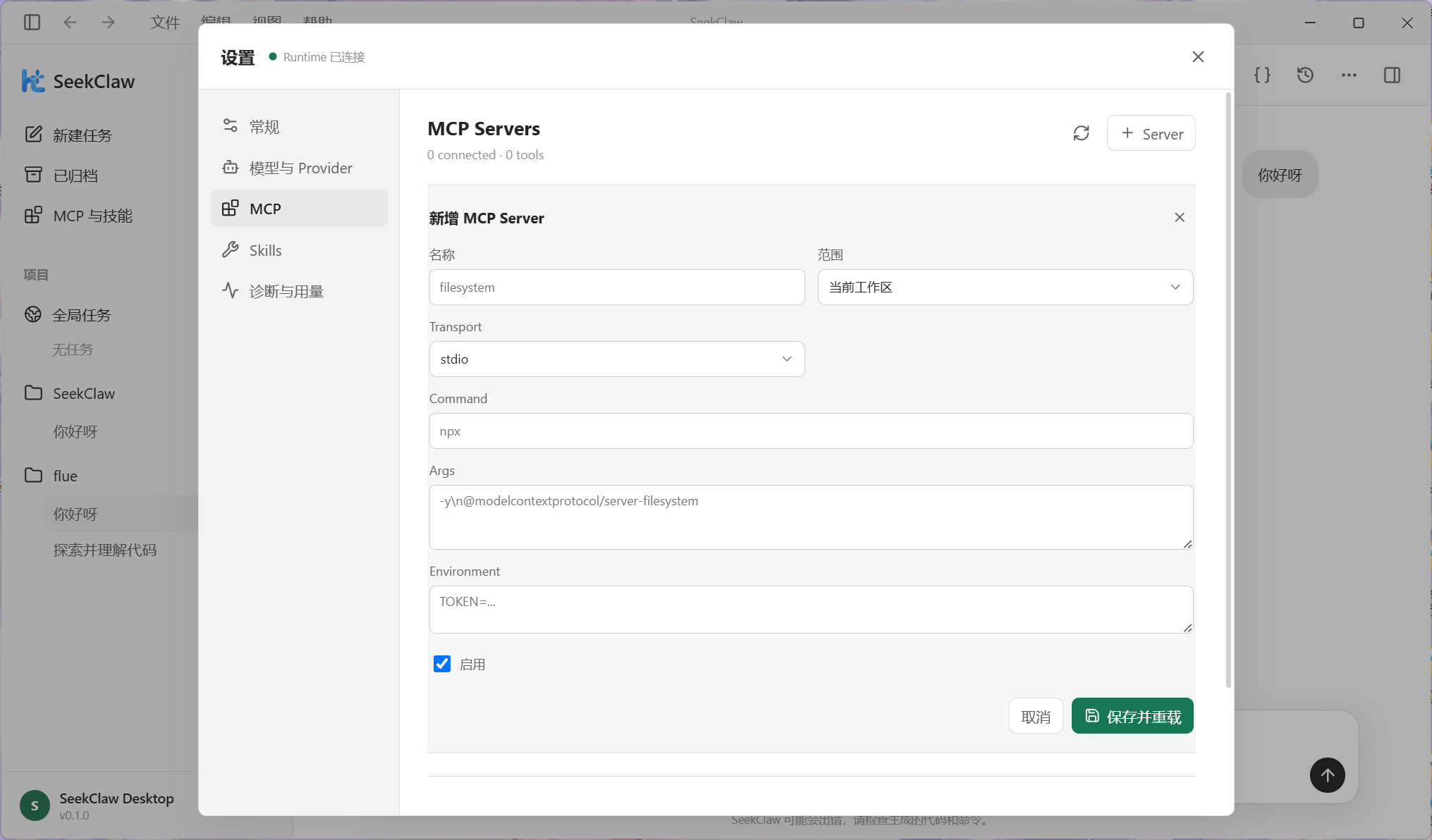
Queries return MCP environment-variable names but not their sensitive values. When editing an existing server, enter again any environment values that should be persisted.
JSON configuration
Global servers can be stored under mcp.servers in ~/.seekclaw/config.json. A workspace can use .seekclaw/mcp/servers.json or the mcp field in .seekclaw/config.json; a workspace entry with the same name overrides the global one.
{
  "servers": {
    "filesystem": {
      "transport": "stdio",
      "command": "npx",
      "args": ["-y", "@modelcontextprotocol/server-filesystem", "E:\\Project"],
      "env": { "TOKEN": "..." },
      "enabled": true
    },
    "remote-tools": {
      "transport": "sse",
      "url": "https://mcp.example.com/sse",
      "enabled": true
    }
  }
}
The current McpServerConfig has no autoConnect or custom HTTP headers field.
Connection and reload behavior
The Daemon begins accepting IPC connections before MCP initialization proceeds serially in the background. A workspace switch, configuration save, or mcp.reload unregisters old tools and prompts and closes old clients before loading the new configuration, preventing stale duplicate registrations.
Use the CLI to inspect connections:
seekclaw mcp list
seekclaw mcp test
mcp test connects to every enabled server and reports its status and tool count. Desktop provides equivalent visual status and reload controls.