Providers, Models, and Smart Routing
SeekClaw treats service endpoints, credentials, and model capabilities as editable configuration. The seed configuration includes common service templates, and you can add any compatible service through Desktop, CLI, or ~/.seekclaw/config.json.
Wire protocols and built-in templates
The Runtime currently implements two wire protocols:
anthropic: Anthropic Messages API;openai: OpenAI Chat Completions API, also used for OpenAI-compatible services.
The initial templates include:
| Provider ID | Wire protocol | Default endpoint | Default state |
|---|---|---|---|
anthropic |
Anthropic | https://api.anthropic.com |
enabled |
openai |
OpenAI | https://api.openai.com/v1 |
enabled |
google |
OpenAI compatible | https://generativelanguage.googleapis.com/v1beta/openai |
enabled |
mimo |
OpenAI compatible | https://token-plan-cn.xiaomimimo.com/v1 |
enabled |
openrouter |
OpenAI compatible | https://openrouter.ai/api/v1 |
disabled by default |
ollama |
OpenAI compatible | http://localhost:11434/v1 |
disabled by default |
lmstudio |
OpenAI compatible | http://localhost:1234/v1 |
disabled by default |
DeepSeek, Azure OpenAI, enterprise gateways, and other compatible services can be added with kind: "openai". Model IDs, context windows, output limits, capability flags, and pricing remain user-managed data rather than hard-coded Runtime constants.
Configure Providers in Desktop
Open “Settings → Models & Providers” to manage Providers, Profiles, and the model catalog:
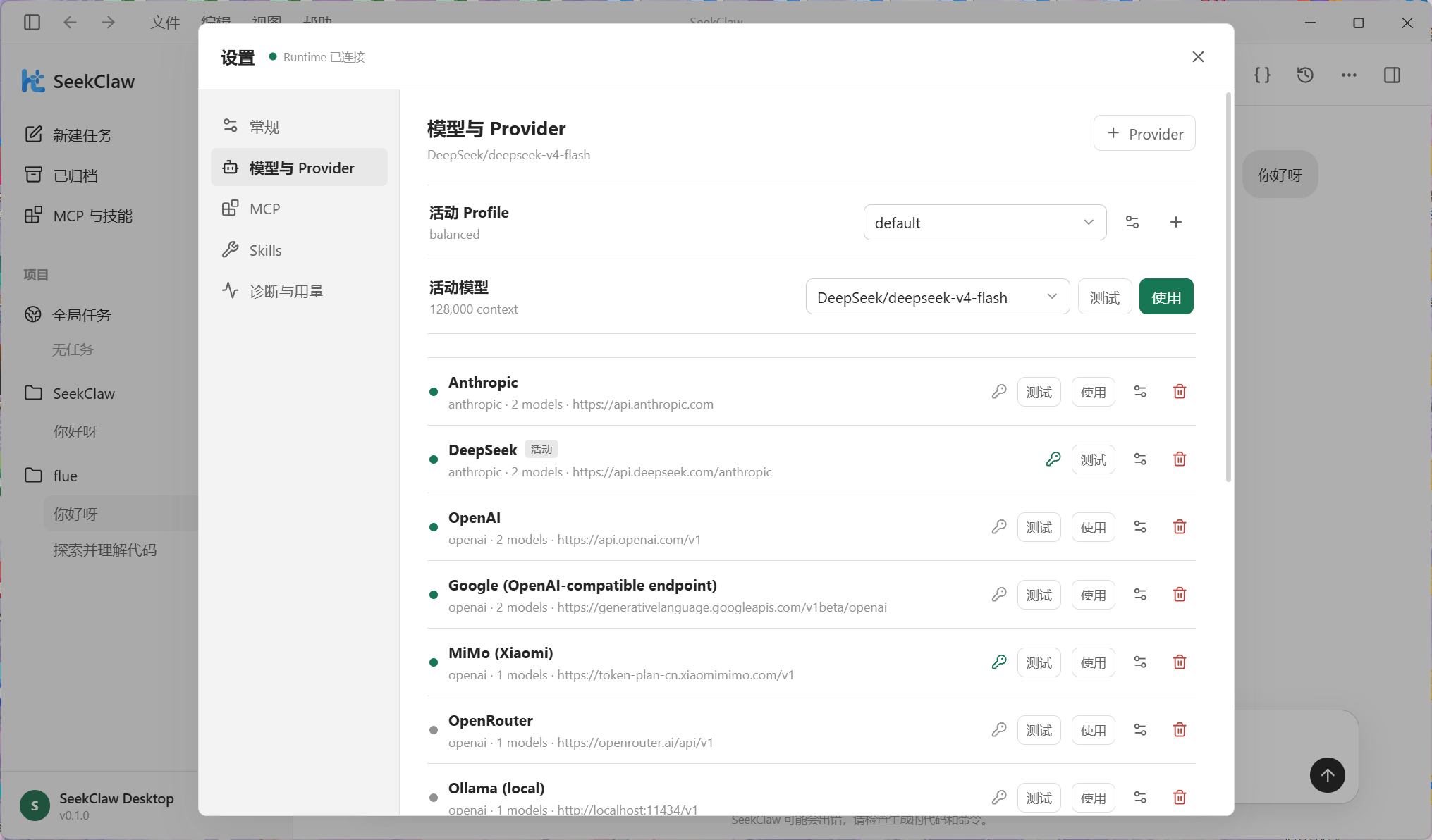
- Select “+ Provider” or edit an existing entry.
- Choose the
openaioranthropicprotocol and enter the ID, name, Base URL, and model IDs. - Enter the API key directly; it is stored in the configuration file.
- Configure proxy, timeout, priority, prompt caching, and enabled state as needed.
- Save and select “Test,” then activate the Provider or model.
The apiKey value is stored explicitly in the configuration and is read, displayed, and edited directly by Desktop. Runtime does not read API keys from environment variables.
On request failure, the Runtime preserves the Provider name, HTTP status, and response body. Protocol mismatches, missing tool results, invalid model IDs, and other 400 responses are shown in full so the server's concrete guidance remains available.
Configuration shape
Providers are stored as an array, with models nested under their Provider:
{
  "activeProfile": "default",
  "profiles": {
    "default": { "provider": "deepseek", "model": "deepseek-chat", "strategy": "balanced" }
  },
  "providers": [
    {
      "id": "deepseek",
      "name": "DeepSeek",
      "kind": "openai",
      "baseUrl": "https://api.deepseek.com/v1",
      "apiKey": "your-api-key",
      "promptCaching": true,
      "enabled": true,
      "priority": 0,
      "timeoutSeconds": 120,
      "models": [
        {
          "id": "deepseek-chat",
          "contextWindow": 128000,
          "maxOutput": 8192,
          "capabilities": { "streaming": true, "toolCalling": true }
        }
      ]
    }
  ]
}
Use "apiKey": "sk-..." to store a key directly, but never commit a personal global configuration containing credentials.
promptCaching is enabled by default. OpenAI-compatible services keep using their automatic prefix caches; the Anthropic protocol additionally places cache_control checkpoints after the stable system prompt and tool definitions. Disable it in Desktop or set "promptCaching": false when an older Anthropic-compatible gateway rejects that field. The default prompts contain no dynamic timestamp, and tool definitions are sorted by name so the cached prefix remains byte-stable across steps.
Profiles and routing
A Profile can pin a Provider and model or specify only a strategy and let the Runtime build a candidate chain. Seed strategies are:
fast: prioritize low latency;balanced: balance quality, speed, and cost;quality: prioritize high-capability models;cheap: prioritize low cost;offline: prioritize Ollama or LM Studio.
The default load-balancing mode is priority. Candidate attempts support exponential backoff, a maximum attempt count, circuit-break thresholds, and cooldowns. Once the first streamed token arrives, the Runtime does not switch Providers midway through an answer, preventing output from two models from being combined.
CLI administration
seekclaw provider list

seekclaw provider add --id deepseek --kind openai \
  --api-key "sk-..." \
  --base-url "https://api.deepseek.com/v1" \
  --model "deepseek-chat"

seekclaw provider test deepseek
seekclaw model list
seekclaw usage
See Configuration Reference for all fields and FAQ & Diagnostics for connection troubleshooting.